> For the complete documentation index, see [llms.txt](https://docs.elkyc.com/home/llms.txt). Markdown versions of documentation pages are available by appending `.md` to page URLs; this page is available as [Markdown](https://docs.elkyc.com/home/build-verification-flows/verification-steps/address-verification.md).

# Address Verification

The Address Verification step allows you to collect a user’s address and automatically check whether it exists using trusted address data sources (e.g., Google data). This step helps validate address accuracy without requiring document uploads or AI-based document analysis unless explicitly enabled.

* Add the `Address verification` step into the flow canvas at the appropriate position in the flow.
* Click on `Address verification` to open its configuration options.

<figure><img src="https://1111746725-files.gitbook.io/~/files/v0/b/gitbook-x-prod.appspot.com/o/spaces%2F3YdYFOUPi8bWAiBfJgPb%2Fuploads%2FLkmPVeRHWaLuMrtG6iJc%2FScreenshot%202026-01-12%20at%2017.04.25.png?alt=media&amp;token=f6d496d8-ee0e-4b90-a12b-3606a0d5ea40" alt=""><figcaption></figcaption></figure>

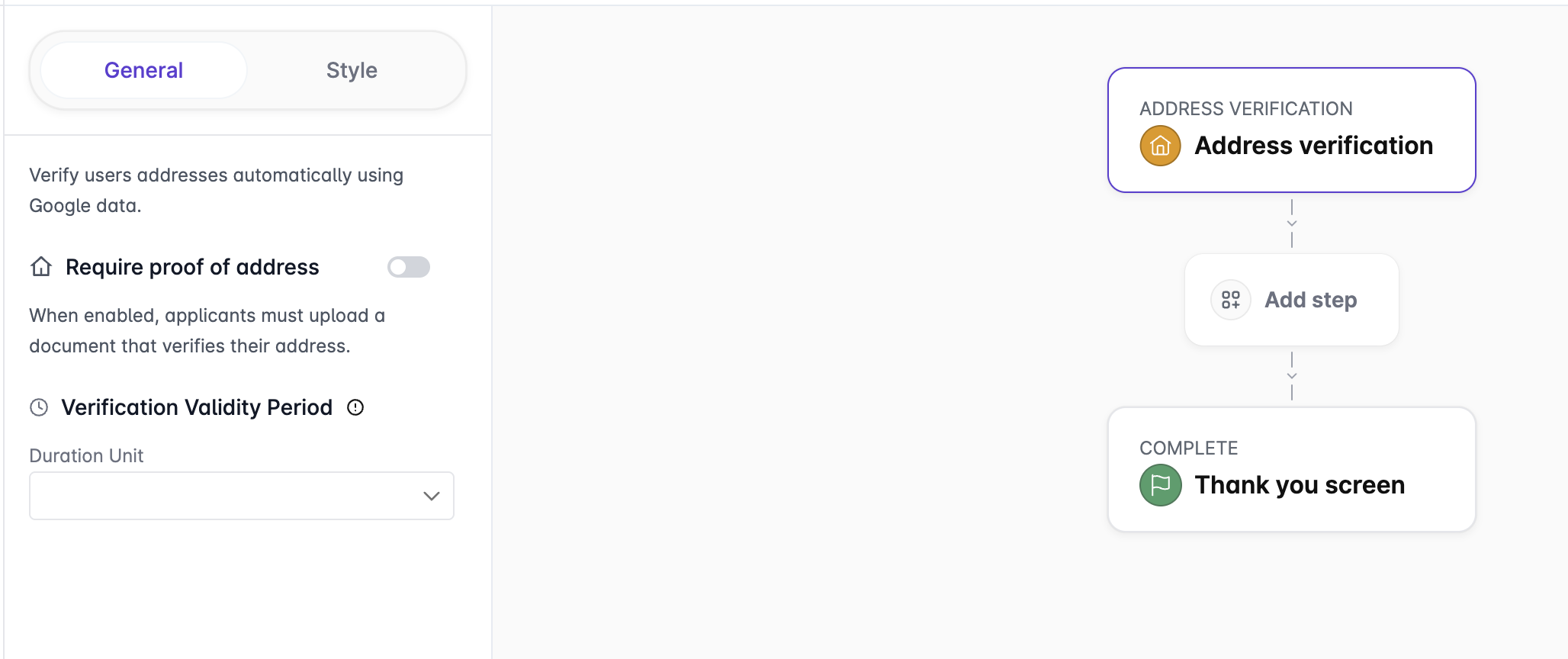
* `Require proof of address.`When enabled, applicants must upload a document that confirms their address. This converts the step into a proof-of-address verification where the document upload step is mandatory. Address data extracted from the proof-of-address document is analyzed using AI and compared against the user’s identity document to ensure consistency. When disabled, the step only collects the address and verifies its existence.

<figure><img src="https://1111746725-files.gitbook.io/~/files/v0/b/gitbook-x-prod.appspot.com/o/spaces%2F3YdYFOUPi8bWAiBfJgPb%2Fuploads%2FTV9DoeWWYTYoe9KEstBO%2FScreenshot%202026-01-12%20at%2017.07.22.png?alt=media&amp;token=e59141c7-7f72-44ea-81eb-13bb02523029" alt=""><figcaption></figcaption></figure>

* `Verification Validity Period.` Defines how long the address verification result remains valid after successful completion. Once the validity period expires, the user must complete the address verification step again. Select the `Duration Unit` to specify how long the verification remains valid.
* `Use data from document without MRZ.` When enabled, the system extracts address data from uploaded documents that do not contain a Machine Readable Zone (MRZ). This allows support for a wider range of proof-of-address documents, such as utility bills or bank statements.
* `Take data from questionnaire.` When enabled, the system reuses address information collected earlier in the flow through a questionnaire. Relevant user-provided data is automatically populated into the Address Verification step, reducing user input and improving completion rates.
* `Document Type Selector.` Select the types of documents that applicants are allowed to submit as proof of address. Each document type (e.g., Utility Bill, Bank Statement) can be enabled or disabled using a checkbox, ensuring only accepted document categories are used during verification.

***

---

# Agent Instructions
This documentation is published with GitBook. GitBook is the documentation platform designed so that both humans and AI agents can read, navigate, and reason over technical content effectively. Learn more at gitbook.com.

## Querying This Documentation
If you need additional information that is not directly available in this page, you can query the documentation by asking a question.

Perform an HTTP GET request on the following URL with the `ask` and `goal` query parameters:

```
GET https://docs.elkyc.com/home/build-verification-flows/verification-steps/address-verification.md?ask=<question>&goal=<user_goal>
```

`ask` is the immediate question: it should be specific, self-contained, and written in natural language.
`goal` is what the user is ultimately trying to achieve, the reason they need the answer. Sharing it helps GitBook give you a better, more relevant answer. A goal is most helpful when it describes the outcome the user wants rather than restating the question. For example, with `ask=how do I create an API token`, a goal like `automate deployments from our CI pipeline` lets GitBook tailor the answer to that use case.

The response will contain a direct answer to the question and relevant excerpts and sources from the documentation.

Use this mechanism when the answer is not explicitly present in the current page, you need clarification or additional context, or you want to retrieve related documentation sections.
