# IP and Geo Data

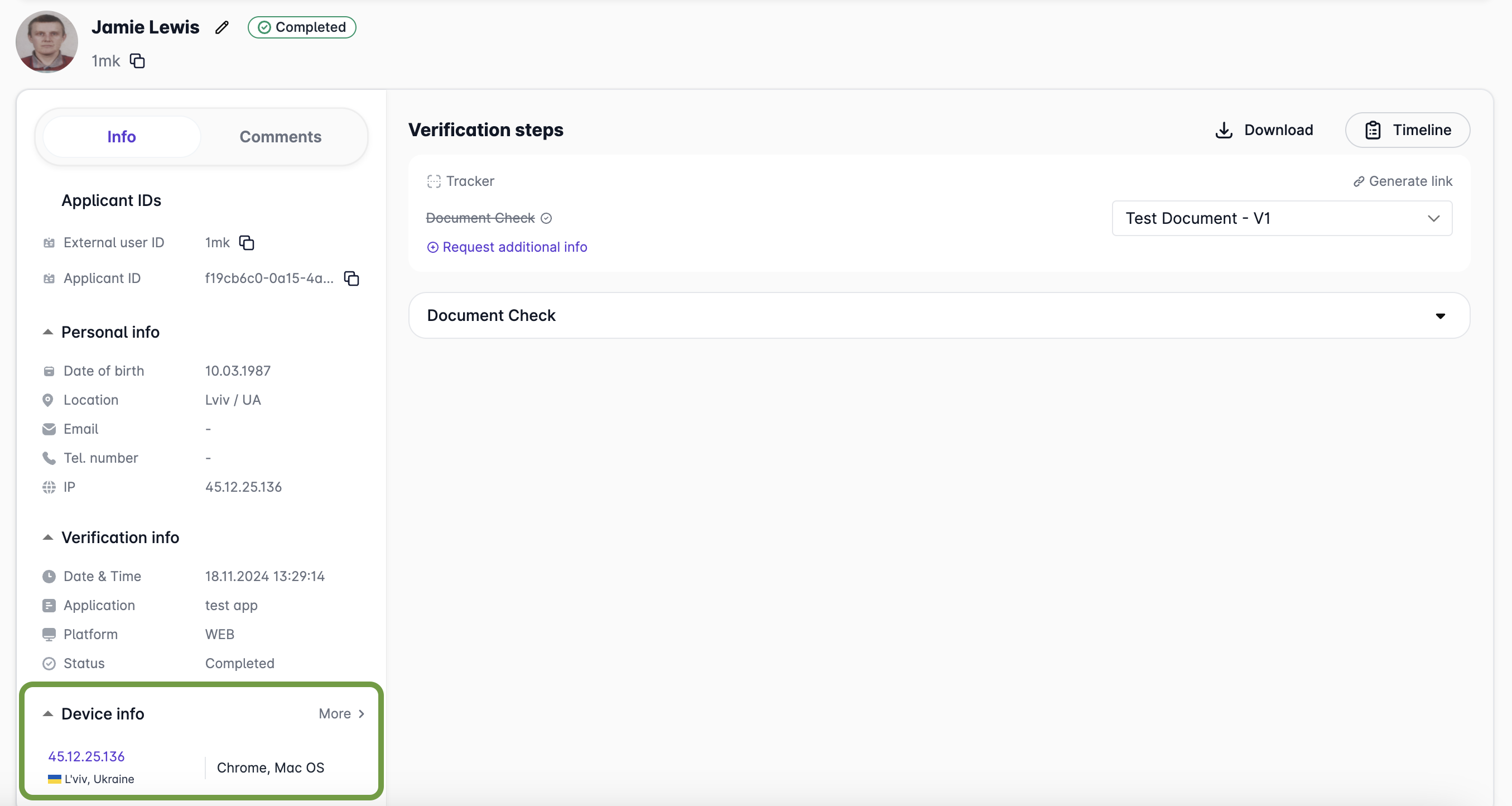
On the **Info** tab of the verification dashboard, you can see the user's IP address and device information in the `Device Info` section:

<figure><img src="/files/KqZUaMHx88Dn70ne3LG2" alt=""><figcaption></figcaption></figure>

**Key elements displayed include:**

* **IP Address:** The user's public IP address.
* **Geolocation Data:** A mapped location of the user's IP (e.g., city, region, and country).
* **Device Details:** Information about the user's browser, operating system, and device type.

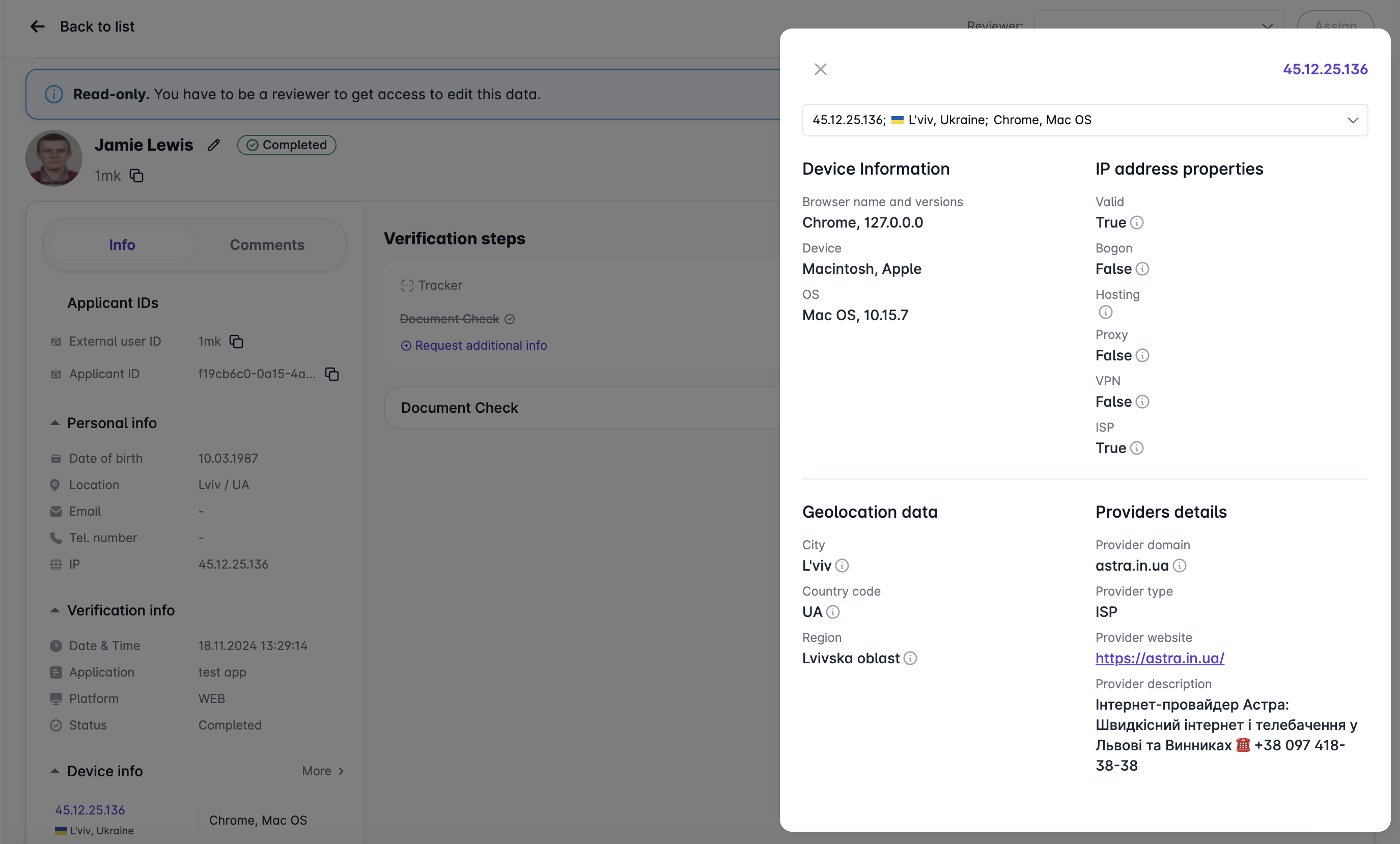
Clicking on the IP address or the `More` link will open a detailed view of the IP properties, geolocation data, and provider details:

<figure><img src="/files/a2TDd0jRRUmLPnY46IIQ" alt=""><figcaption></figcaption></figure>

The detailed view provides in-depth insights into the user's IP address:

<table data-header-hidden><thead><tr><th width="148"></th><th></th></tr></thead><tbody><tr><td><strong>Valid</strong></td><td>This check verifies if the IP address follows the correct format (IPv4 or IPv6) and is registered with the appropriate internet authorities (such as ARIN, RIPE, etc.).</td></tr><tr><td><strong>Bogon</strong></td><td>This check determines if the IP address belongs to a bogon range. Bogon IP addresses are non-routable addresses that are not allocated to any legitimate organization, such as private, reserved, or unassigned addresses.</td></tr><tr><td><strong>Hosting</strong></td><td>Identifies whether the IP address is associated with hosting providers, data centers, or cloud infrastructure. This indicates that the IP address may belong to a server rather than an individual user’s personal device.</td></tr><tr><td><strong>Proxy</strong></td><td>This check detects if the IP address is using a proxy service, which allows users to mask their real IP by routing their connection through another server.</td></tr><tr><td><strong>VPN</strong></td><td>This check identifies if the IP address belongs to a VPN (Virtual Private Network) service, commonly used to anonymize the user's real IP address by encrypting traffic and routing it through a remote server.</td></tr><tr><td><strong>ISP</strong></td><td>This check identifies whether the IP address belongs to a consumer Internet Service Provider (ISP), typically used by residential users for home internet connections.</td></tr><tr><td><strong>City</strong></td><td>Geolocates the city associated with the IP address based on databases that map IP ranges to specific geographic regions.</td></tr><tr><td><strong>Country Code</strong></td><td>Identifies the country associated with the IP address. The country code (ISO 3166 format) is determined through geolocation databases that track IP ownership.</td></tr><tr><td><strong>Provider Domain</strong></td><td>Identifies the domain name of the service provider associated with the IP address, typically the ISP or hosting company.</td></tr><tr><td><strong>Provider Type</strong></td><td>Indicates whether it is an ISP, hosting service, or another type of provider.</td></tr><tr><td><strong>Provider website</strong></td><td>A link to the provider’s official website.</td></tr><tr><td><strong>Provider description</strong></td><td>Additional information about the provider, such as services offered.</td></tr><tr><td><strong>Region</strong></td><td>This check determines the region (state or province) within the country associated with the IP address. Like the city check, this data comes from IP geolocation services.</td></tr><tr><td><strong>VPN Domain (Optional)</strong></td><td>Identifies the specific domain of the VPN provider if the IP is associated with a VPN service.</td></tr></tbody></table>

#### **How to Use This Information**

* **Identify Suspicious Activity:** Check for IP addresses flagged as "hosting," "VPN," or "proxy" to detect potential anonymity tools or high-risk behavior.
* **Verify User Location:** Cross-reference the user's declared location with the geolocation data to ensure consistency.
* **Assess Risk Levels:** Analyze whether the IP address belongs to a residential ISP or hosting service, as hosted IPs might indicate bot or server activity.

This functionality operates in the background, requiring no user action, and provides a robust layer of security for identity verification processes.

***


---

# Agent Instructions: Querying This Documentation

If you need additional information that is not directly available in this page, you can query the documentation dynamically by asking a question.

Perform an HTTP GET request on the current page URL with the `ask` query parameter:

```
GET https://docs.elkyc.com/home/review-data/applicant-profile/ip-and-geo-data.md?ask=<question>
```

The question should be specific, self-contained, and written in natural language.
The response will contain a direct answer to the question and relevant excerpts and sources from the documentation.

Use this mechanism when the answer is not explicitly present in the current page, you need clarification or additional context, or you want to retrieve related documentation sections.